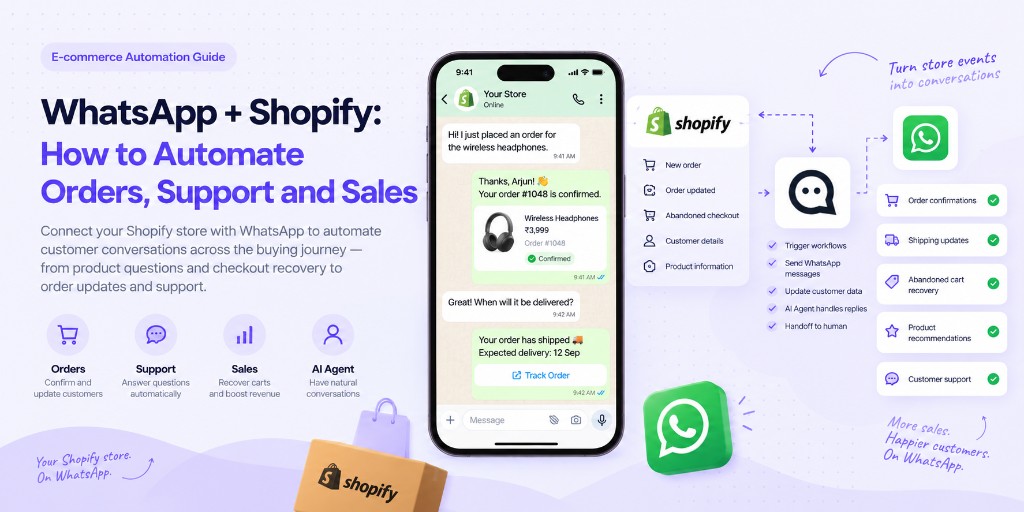
Shopify manages the transaction. WhatsApp manages the conversation.
The problem is that most stores still treat them as two separate systems. A customer browses a product in Shopify, asks a question on WhatsApp, abandons checkout, receives an order confirmation by email, asks where the package is, and later wants to buy again — each moment handled by a different tool, with no memory of the last one.
When Shopify and WhatsApp are connected, these moments can become one automated customer journey instead of five disconnected touchpoints.
This guide covers what a Shopify–WhatsApp integration actually does, the ecommerce workflows worth automating first, where basic automation stops being enough and an AI Agent adds value, and how this gets implemented in practice using WABB.
What Happens When Shopify and WhatsApp Are Connected?
Shopify holds the store side of things: customers, products, orders, carts and checkouts, and fulfillment status. WhatsApp holds the conversation side: questions, replies, and every sales or support interaction with a buyer.
An integration sits between the two and connects events on one side to actions on the other.
Shopify Event
An order, a shipment, an abandoned checkout
Automation
A workflow decides what should happen next
WhatsApp Message / Conversation
The customer receives it where they already are
Customer Reply
A question, an objection, a change request
Next Action
Answer, escalate, update the record, or close the loop
In practice, that pattern repeats across most of the events a Shopify store already generates:
The rest of this guide walks through each of these, one workflow at a time.
1. Send Order Confirmations on WhatsApp
A customer completes checkout on Shopify. Instead of relying only on an order-confirmation email, the same event can trigger a WhatsApp message:
Thanks, Arjun 👋
Your order #1048 is confirmed.
Wireless Headphones
₹3,999
We'll message you again when it ships.
This works for a simple reason: customers tend to notice a WhatsApp message quickly, the conversation stays in one channel instead of splitting across email and chat, and — unlike an email — the customer can just reply if something's unclear.
This is illustrative copy; actual open and response behavior will vary by store and audience, and no specific rate is claimed here.
2. Keep Customers Updated After Purchase
The same pattern extends to fulfillment. When Shopify marks an order as shipped, WhatsApp can carry the update:
Your order #1048 has shipped 🚚
Expected delivery: 12 Sep
can i change delivery address?
This is the moment a one-way notification turns into a conversation — and it's where the distinction between automation and an agent matters.
Basic automation
Sends the shipping update. That's the extent of what it does — it doesn't know what to do with a reply.
AI Agent / human support
Reads the reply, checks whether the order has already left the warehouse, and either updates the address or explains why it can't at this stage.
3. Recover Abandoned Checkouts With Context
Cart recovery on WhatsApp is easy to do badly. A generic nudge reads as spam and rarely addresses why the customer actually stopped.
✕ Generic reminder
"You left items in your cart! Buy now!"
A more useful version opens the door to the actual question that stalled the purchase:
Hi Priya — you were looking at the black wireless headphones earlier.
Still deciding? I can help with sizing, delivery or product questions.
does it work with iphone?
Yes — it supports iPhone via Bluetooth.
Want me to send you the checkout link again?
The highest-value version of cart recovery isn't reminder messaging. It's letting the customer ask the question that stopped the purchase in the first place — and answering it before the moment passes.
Checkout abandoned
Contextual WhatsApp follow-up
Customer objection or question
Answer
Return to checkout
No specific recovery rate is claimed here — results depend on the store, audience and offer.
4. Help Customers Choose the Right Product
Not every WhatsApp conversation starts with an order. Some start with a customer who isn't sure what to buy yet.
need headphones under 5k mostly for calls
Do you use them mostly at home or while travelling?
office + travel
Then I'd prioritize noise cancellation and mic quality.
I have two options under ₹5,000. Want the lighter one or the one with better battery?
Illustrative options
AirFit Buds Lite
₹4,499 · lighter, 6-hr battery
AirFit Buds Max
₹4,899 · 18-hr battery, ANC
To narrow options like this, an AI Agent can draw on the product catalog, pricing, prior context from the conversation, and — where the integration actually provides it — availability. If live stock data isn't connected, the agent should say so rather than imply certainty it doesn't have.
5. Answer Store Questions Without Starting From Zero
Most WhatsApp traffic for a Shopify store isn't exotic. It's the same handful of questions on repeat:
is COD available for pincode 560103?
Yes, Cash on Delivery is available for that pincode.
Source · Store Knowledge Base
The important distinction is what the agent is allowed to draw on. It should answer from store policies, product information, and order or customer context — and say when it doesn't know, rather than guess.
6. Hand the Conversation to a Human When It Matters
Some conversations shouldn't be resolved by automation at all — they need a person, and they need the context to arrive with them.
the order arrived damaged and i want a refund
I'm sorry about that. I'll bring in our support team so they can handle the refund properly.
I've already shared your order number and the issue with them.
Handoff
Customer
Priya
Order
#1048
Issue
Damaged item
Intent
Refund request
Assigned
Support Team
The customer shouldn't have to repeat the order number and the problem a second time to a human. That's what the handoff card exists to prevent.
7. Continue the Conversation After Delivery
The relationship doesn't have to end at delivery. Depending on the product, that can mean a reorder reminder, a complementary product suggestion, a support follow-up, a review request, or a replenishment nudge for consumables — without overpromising personalization the setup doesn't actually support.
Subscription / consumable
Your coffee subscription order was delivered last week.
Need another pack next month, or want to skip?
General Shopify store
Hope the headphones arrived okay 👍
Want help setting them up?
Where Basic Shopify Automation Ends — and AI Agents Begin
Every use case above has two versions: one where automation reacts to an event with a fixed message, and one where an agent carries the conversation further.
| Moment | Basic Automation | AI Agent |
|---|---|---|
| Order event | Sends a predefined message | Starts a contextual conversation |
| Abandoned checkout | Sends a reminder | Handles objections and questions |
| Product discovery | Static recommendations | Asks questions and narrows options |
| Support | Fixed FAQ reply | Uses order, product and conversation context |
| Follow-up | Scheduled message | Contextual next step |
| Handoff | Assigns the chat | Assigns it with full conversation context |
Automation reacts to events. AI Agents can decide what to do next inside the conversation.
That's a difference in scope, not a claim of full autonomy — an agent still works within the boundaries and data it's given, and hands off what it shouldn't handle alone.
What Information Can Shopify Bring Into the WhatsApp Conversation?
Depending on the integration and workflow, Shopify data can be used to personalize WhatsApp automation. In practice, that typically draws from categories like:
Exactly which fields are available depends on how the workflow is set up — not every field is supported in every configuration.
How Shopify + WhatsApp Automation Works in WABB
Everything above is the pattern. Here's the shape it takes as a working setup — without turning this into a full setup guide.
The building blocks behind that flow are the same ones used throughout WABB:
Want to see the exact setup?
How to Connect Shopify with WABBWhat Shopify Does. What WABB Does.
Every workflow in this guide splits the same way: Shopify owns the transaction, WABB owns the conversation around it.
What Shopify does
- Product
- Checkout
- Order
- Fulfillment
What WABB / WhatsApp does
- Conversation
- Qualification
- Follow-up
- Support
- Handoff
FAQ
Common Questions
Can Shopify connect to WhatsApp?
Yes. Shopify events — like new orders, shipments, or abandoned checkouts — can be connected to WhatsApp through an automation platform such as WABB, so the right message goes out on the right event.
How does the Shopify–WABB integration actually work?
Through webhooks. A Shopify event — a new order, a shipment, an abandoned checkout — fires a webhook that WABB listens for, and that triggers the matching WhatsApp automation. It also works in reverse: a WABB webhook can be called by Shopify, or through a connector like Make, so an external event can start a WhatsApp conversation. No custom backend is required — see How to Connect Shopify with WABB for the exact setup.
Can Shopify send order updates on WhatsApp?
Yes — order confirmations, shipping and delivery updates, and similar fulfillment events can trigger a WhatsApp message instead of, or alongside, email.
Can WhatsApp recover abandoned Shopify carts?
It can send a contextual follow-up when a checkout is abandoned, and — with an AI Agent — let the customer ask the question that stopped them before they return to checkout. Recovery outcomes vary by store; no fixed rate applies universally.
Can a WhatsApp chatbot answer Shopify product questions?
Yes, when it's connected to the store's product information. A basic chatbot can answer fixed FAQs; an AI Agent can go further and narrow down options based on what the customer is asking for.
Can Shopify customer data be used in WhatsApp automation?
Depending on the integration and workflow, yes — fields like customer name, order details, and status can personalize the conversation. Exactly which fields are available depends on how the workflow is configured.
Can AI Agents recommend Shopify products?
Yes — by asking a few clarifying questions and matching the answers against the product catalog, pricing, and whatever context the conversation has already provided.
Can customers reply to automated Shopify WhatsApp messages?
Yes — that's the main advantage over email. A reply can be picked up by an AI Agent or routed to a human, rather than going nowhere.
What is the difference between Shopify WhatsApp automation and a WhatsApp chatbot?
Automation reacts to a Shopify event with a predefined message. A chatbot follows a fixed decision tree. An AI Agent goes further still — it can use order, product and conversation context to decide what to say next, rather than following a script.