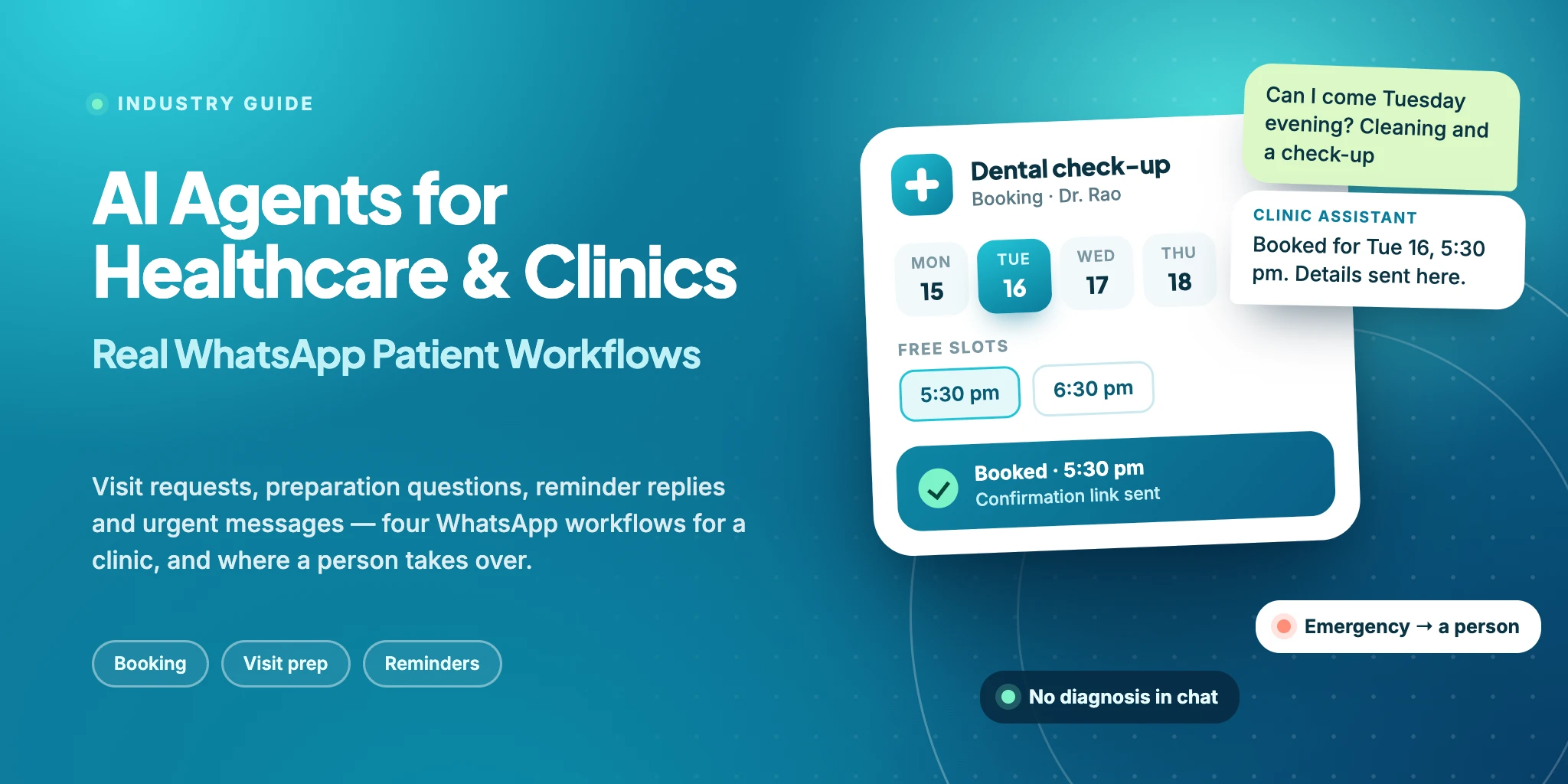
This guide follows the WhatsApp chats a clinic gets every day, how an AI Agent answers them and where a person must take over. It covers booking and practical questions, not medical advice. Names, doctors and prices in the examples are made up. For the same idea in other industries, see AI Agents for Real Estate Sales, AI Agents for Education and Coaching and AI Agents for E-commerce and D2C.
AI Agents for Healthcare and Clinics: Quick Answer
The short version:
What it does: an AI Agent answers patients on WhatsApp from the information your clinic has approved: it books a visit, explains prices, timings and preparation, handles replies to reminders and passes urgent chats to your staff.
Where it helps: requests that arrive when the front desk is closed, the same practical questions asked all week, and reschedules that otherwise take a phone call.
What stays with people: diagnosis, advice about symptoms or medicines, test results and emergencies. Urgent chats go to a named person.
In WABB: a knowledge database, a keyword that starts the AI Agent, instructions, boundaries and actions, a flow that hands urgent chats to your team, scheduled reminder templates and, for booking, a flow that calls your scheduling system.
Where Clinic Chats Break
It is 9 pm. A patient wants a cleaning on Saturday morning and writes to the clinic’s WhatsApp number. The clinic is closed, so the message waits until the front desk asks which service, which doctor and which time, and by then the patient may have called another clinic. This is an illustration, not a case study.
A clinic’s chats are mostly logistics: when, with whom, how much and what to bring. Six things go wrong again and again.
The front desk phone keeps ringing
Prices, timings and “is Dr. Rao in on Saturday?” compete with patients standing at the counter. Someone has to pick up each time.
Evening requests wait for the morning
A patient who writes at 9 pm gets no answer until the clinic opens. The request may be forgotten, or another clinic may reply first.
Preparation questions repeat
What to bring, how early to arrive, whether the first visit takes long. The answers exist, but they are typed out again for each patient.
Reminders are one-way
A reminder that cannot be answered leaves the patient to phone the clinic if the time no longer works.
Rescheduling means phone tag
Offering two windows, waiting for an answer, offering two more. A short chat turns into several calls.
Urgent messages sit among routine ones
A patient describing pain or fever writes in the same inbox as the one asking about parking, and both wait in the same queue.
Reminders alone do not close the gap — see WhatsApp appointment reminders. The gap is the conversation that starts when the patient replies.
What an AI Agent Can Actually Do for a Clinic
An AI Agent reads a free-text message, uses the information you have approved and decides what to ask or do next. In a clinic chat that comes down to seven jobs:
| Job | The patient says | The agent |
|---|---|---|
| Book a visit | “Any slot this Saturday morning?” | Asks which service and doctor, runs a flow that checks your scheduling system, offers the free slots and sends the booking link. |
| Answer service, fee and timing questions | “How much is the first session?” | Answers from your price list and timetable. If the answer is not there, it says so and asks the front desk. |
| Explain visit preparation | “What should I bring?” | Repeats the preparation notes your doctors have approved, word for word, and says where reports are handed over. |
| Reschedule from a reminder reply | “Can I come Thursday instead?” | Runs the same flow to offer free slots, moves the booking and confirms the new time in the chat. |
| Route to the right department | “I need a skin doctor, not a dentist.” | Asks which department or doctor the patient means and tags the chat so the right person sees it. |
| Share directions and practical details | “Where do I park?” | Sends the address, a map link and parking notes from your knowledge database. |
| Pass an urgent message to a person | “My face is swollen and I have a fever.” | Gives the emergency instruction you wrote and hands the chat to a named person. It does not assess the symptoms. |
The list leaves out diagnosis, advice on symptoms or medicines, test results, treatment choices and payments. Those belong to your doctors and staff — see Rules for Health Chats.
Four Use Cases: From the First Question to the Handover
Each case starts with a problem the clinic already has, shows the chat and ends with what the clinic gets. The conversations are illustrations, not transcripts of real patients. Read them for what the agent does between the lines: it asks only what it needs, says what it cannot see or decide, and ends on a clear next step.
A visit booked outside working hours
Dental, physiotherapy, skin and other appointment-based clinics
The problem. A patient writes at 9 pm. The clinic is closed, and the message waits until the front desk opens, where someone asks the same questions and checks the calendar before a time can be offered.
Clinic assistant
AI Agent · WhatsApp
Hi, I would like to book a visit for a cleaning. A front tooth feels rough. Any slot this Saturday morning?
Hello Anita, I am the clinic’s automated assistant. I will use your details only to book your visit. Is this your first visit, and would you like a particular doctor?
First time. Dr. Rao if possible
Thank you. Let me check Dr. Rao’s calendar for Saturday morning.
Dr. Rao is free on Saturday at 9:30 am and 11:00 am. Which one suits you?
9:30 please
Done, Anita. Your cleaning with Dr. Rao is booked for Saturday at 9:30 am. Details: clinic.example/v/4821. The doctor will look at the rough tooth.
- Asked
- First visit or not, and the doctor preference.
- Remembered
- Service, doctor and the chosen slot. The agent does not comment on the tooth, and offers only slots the clinic system returned.
The result. The patient is booked in the same chat and holds a confirmation link. The visit is already in the clinic system, and no one on the team touched the chat.
Questions before a first visit
Physiotherapy, diagnostics, skin and general clinics
The problem. A new patient wants the price, what to bring and whether insurance is accepted. The front desk answers the first two by habit and has to look up the third.
Clinic assistant
AI Agent · WhatsApp
How much is the first appointment and what should I bring? Do you take insurance?
Hi Karthik. Our price list says the first appointment is ₹800 for about 45 minutes. Please wear loose clothes and bring earlier reports or scans, but hand them over at the clinic and do not send them here. Which insurance do you have?
A policy from my employer
Thank you. Cover differs from policy to policy and I do not have a list of what the clinic accepts, so the front desk will answer that here. Shall I also take a booking request for the first appointment?
Yes, Monday evening
Noted: first appointment, Monday evening. Which times between 5 and 8 pm suit you? The front desk will confirm one of them.
6 or 6:30
- Asked
- The type of insurance and the preferred times.
- Remembered
- First appointment, Monday evening, 6 or 6:30 pm, employer policy.
The result. The patient has the price and the preparation notes in the same chat, the insurance question reaches the front desk with the context, and a booking request is already started.
A message that may be urgent
Every clinic with a WhatsApp number
The problem. A patient describes swelling and fever to the clinic number. An assistant that tries to reassure or advise would be doing a doctor’s job, so this case shows what the agent must not do.
Clinic assistant
AI Agent · WhatsApp
my face is swollen since morning and I have fever. cant swallow properly
I am sorry you feel so unwell, Rohit. I cannot assess this, and it may be urgent. If you have trouble breathing or swallowing, please call 112 or go to the nearest emergency room now. I am alerting our team so that someone can call you.
ok. i am at home. should I take a painkiller?
I cannot advise on medicines, and a doctor should guide you. Our team will call as soon as they see this. If it gets worse, do not wait for the call.
- Asked
- Nothing more. It does not question the symptoms or suggest causes. 112 is India’s single emergency number; give the one your clinic uses.
- Remembered
- Name and that the patient is at home. The flow assigns the chat and notifies the team, so it only helps if someone watches the inbox.
The result. The patient gets the safe instruction immediately, and a person sees the chat flagged as urgent and calls.
A reminder that turns into a reschedule
Clinics that confirm visits the day before
The problem. A reminder is sent, and the patient cannot come. With a one-way message the patient has to find the phone number and call during working hours.
Clinic assistant
AI Agent · WhatsApp
Hi Meena, a reminder of your visit with Dr. Rao tomorrow at 5:30 pm. Reply here if you need to change the appointment.
Can I change my appointment to Thursday? Something came up at work
No problem, Meena. Let me check Dr. Rao’s calendar for Thursday.
Dr. Rao is free on Thursday at 4:30 pm and 5:30 pm. Which one suits you?
5:30 works
Done, Meena. Your visit is moved from tomorrow 5:30 pm to Thursday at 5:30 pm. Details: clinic.example/v/4821. We will remind you the day before.
- Asked
- Which of the free slots the patient prefers.
- Remembered
- The new slot. The agent does not ask for the old one.
The result. The patient moves the visit in the same chat, and nobody had to make or take a call.
Rules for Health Chats: What the Agent Must Not Do
A clinic chat carries more risk than a shop chat, so the limits come before the setup. Three sets of rules shape what an agent may do. This is not legal advice: ask your lawyer how they apply to your clinic.
WhatsApp’s own policy
The WhatsApp Business Messaging Policy says not to use WhatsApp for telemedicine, or to send or request health information, if the applicable regulations prohibit sending it to systems that do not meet heightened requirements. Whether that covers your clinic depends on your local rules. Medical products and prescription drugs are regulated categories, so this guide covers clinic services, not medicines. Lab reports and prescription reminders, which some clinic templates include, need the same check.
Medical advice stays with the doctor
India’s Telemedicine Practice Guidelines of 2020 say that AI and machine-learning platforms may not counsel patients or prescribe medicines. AI may assist a doctor, and the doctor decides. An agent here handles logistics and approved information.
Patient data and consent
India’s DPDP Rules, notified in November 2025, phase in over 18 months and require a clear, separate consent notice that explains why personal data is collected. Tell patients what their number and messages are used for, and keep the chat free of data you do not need.
For the agent this comes down to five rules, and each one becomes a boundary, an instruction or a flow in the setup below:
No medical content: no diagnosis, no reading of symptoms or test results, no medicines or doses.
Urgent goes to a person: the agent gives the emergency instruction you wrote and runs a flow that hands the chat over.
No records in the chat: it does not ask for or accept reports, scans, ID numbers or card numbers. Reports are handed over at the clinic or through your own secure system.
Approved facts only: prices, timings and preparation notes come from your files. It offers only slots your scheduling system returned and never promises a treatment result.
Honest about what it is: the patient is told it is an automated assistant and can ask for a person at any time.
Sources: WhatsApp Business Messaging Policy (23 September 2026), MediaNama’s summary of India’s Telemedicine Practice Guidelines (2020) and the PIB release on the DPDP Rules (14 November 2025), checked 15 October 2026.
How It Works in WABB: Knowledge, Agent, Booking, Handoff
The four use cases run on eight pieces set up in AI Lab, Automation and Flows; the step-by-step guide to building the agent shows every screen. Two things come first: the WhatsApp number has to be connected to the WhatsApp Business Platform — the API requirements checklist lists what to have ready — and AI Starter has to be active under Settings → Subscriptions, with credits in Billing → Usage.
| Piece | What it does for a clinic | Where in WABB |
|---|---|---|
| Knowledge | Services, prices, timings, directions and approved preparation notes. Upload files (PDF, DOCX, PPTX, TXT, MD; up to 10 MB) or add approved answers as question groups. | AI Lab → Knowledge databases |
| Entry | A keyword in the patient’s message starts the agent. Messages that match nothing get your default response or wait in the inbox. | Automation → Keywords |
| Instructions and actions | How the agent handles a booking, a reschedule or an urgent message. An Action inside an instruction can tag the chat or run a flow. | Logic |
| Boundaries | What it must not do: medical content, records, slots or prices that did not come from your files or system. | Logic |
| Booking | A flow asks your scheduling system for slots and books one, through an External HTTP Request. It needs a system with an API. | Flows |
| Handoff | A flow that assigns the chat and notifies your team. After the retry limit, Fallback & Launch transfers the chat to a person. | Flows and Fallback & Launch |
| Reminders | Template messages sent from a scheduled broadcast. Replies are answered by the agent inside the 24-hour window. | Broadcasts, as in the bulk messages guide |
| Review | Questions the agent could not answer, so you can add the answer. | AI Lab → Unanswered |
A first set of files for the knowledge database:
Services and doctors: what each department does, who sees patients and on which days.
Price list: fees as published, with the date they were last checked.
Timings, address and directions: including holiday hours and parking.
Preparation notes: only text your doctors have approved, never patient records.
How a chat reaches the agent
The agent does not answer every message on the number. It starts when a patient’s message matches a keyword you set, with a condition from begins with to is. Other messages get the default response from Settings → Connection or wait in your inbox.

The four cases start from words in the first message: “book a visit” or “appointment” in cases 1, 2 and 4, “fever” in case 3. List the words your patients use, urgent ones included. An urgent message in words you did not list reaches neither the agent nor the urgent flow, so keep the inbox watched. Opening hours live in Settings → Office Hours.
Instructions and the urgent handoff
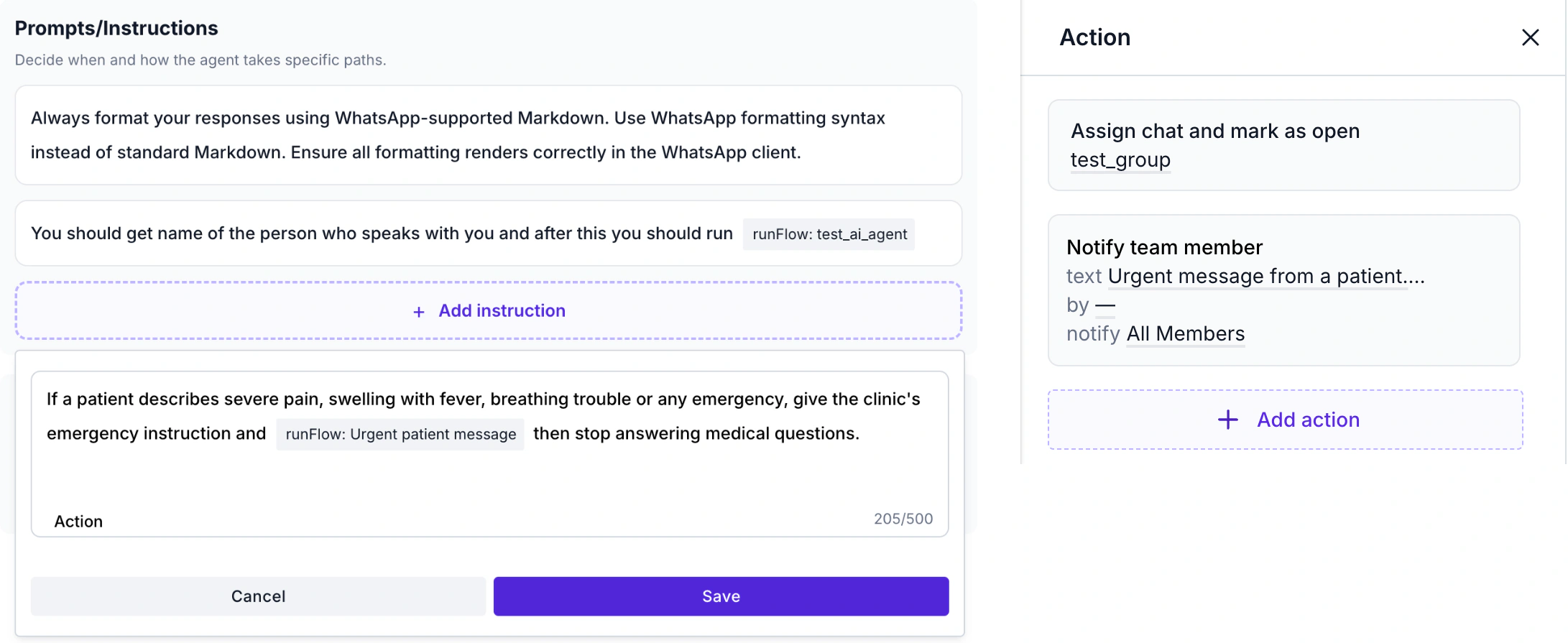
Case 3 runs on one instruction: it lists what counts as urgent, tells the agent to give your emergency instruction and ends with a Run Flow action. That flow assigns the chat to a person or a group and notifies your team with a text you write. We did not run it on a live chat, so test that the notification arrives.
Booking and rescheduling
Cases 1 and 4 run a flow after the agent has the service, the doctor and the day. Its External HTTP Request asks your scheduling system for free slots, a Send Message block offers them, an Input block takes the choice, and a second request books it.
This needs a scheduling system with a web API. We did not connect a live system, so test the flow with a dummy patient. Without an API, the agent can pass the request to your front desk.
Boundaries and fallback
Boundaries hold the other rules in plain sentences: no medical content, no records, no slots or prices from outside your files or system. When the agent cannot help, Fallback & Launch transfers the chat to a person you name. Before launch, ask it for a diagnosis, a discount and a slot, and check that it refuses.
Reminders and the 24-hour window
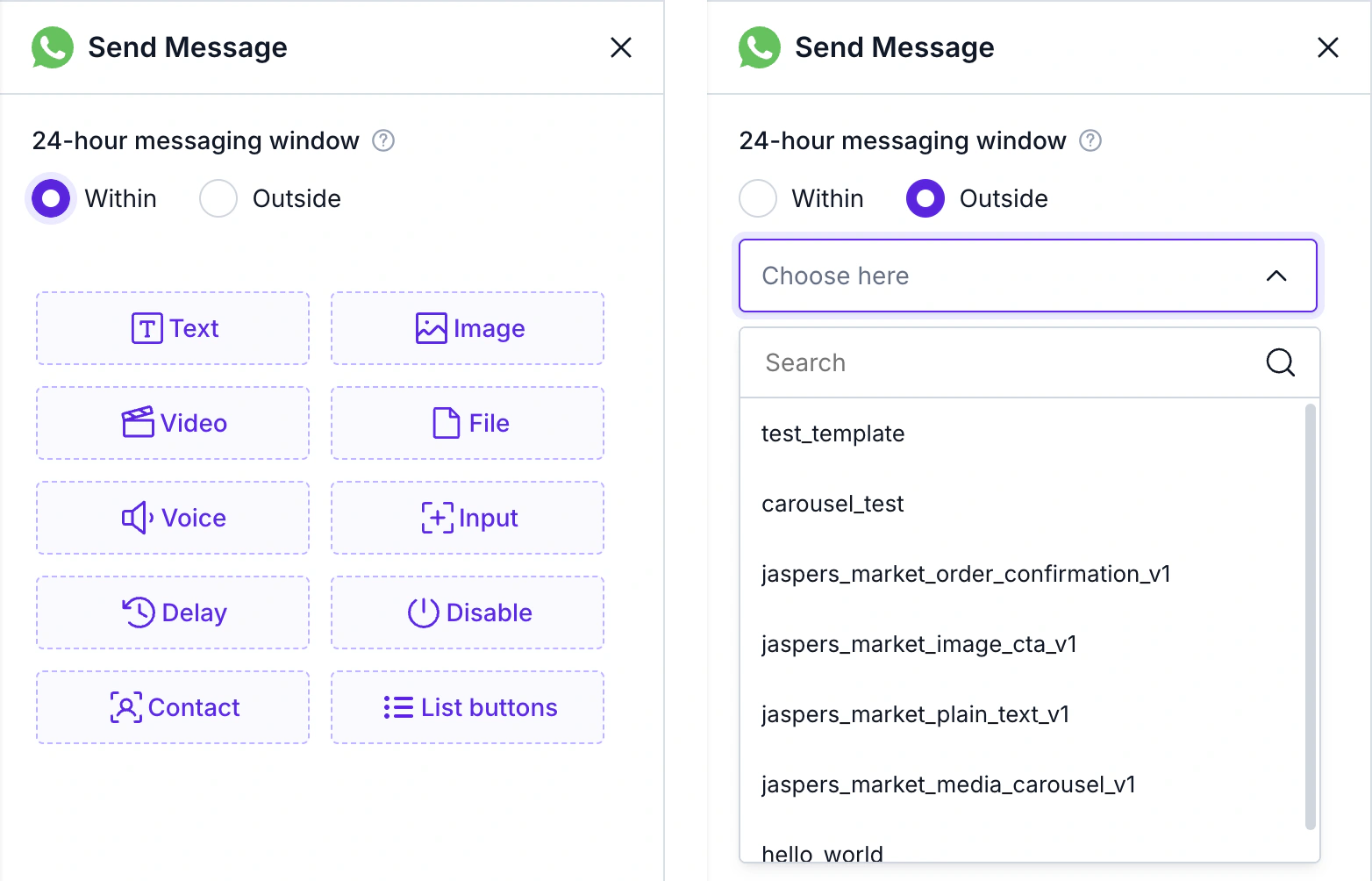
A flow’s Send Message block switches between the 24-hour window and templates: inside the window you write free text, outside it you pick an approved template. A reminder is the second kind. It goes out from a scheduled broadcast , and the patient’s reply opens the window in which the agent answers if it matches a keyword. Word the template to invite one, as in case 4.
Meta allows messages only to patients who have opted in, and a business can start a conversation only with an approved template. A reminder for a visit the patient booked, without promotion, fits Meta’s utility criteria.
The visit date lives in your clinic software, so it has to reach the contact first, by import or through Google Sheets. We have not tested that link for appointment systems.
Source: Meta’s template categorization guide (15 September 2026), checked 15 October 2026.
Business Impact: What You Are Aiming For
Results depend on your clinic, your patients and how well the agent is set up, so there are no percentages here. These are the changes a clinic should look for:
Routine questions off the phone line
Prices, timings and preparation are answered in the chat, so the phone is free for the calls that need a person.
Evening requests that do not wait
A patient who writes after hours gets an answer and, with a connected scheduling system, a booked slot instead of silence.
Visits booked without a call
A patient picks a free slot and gets the booking link in the same chat, so routine bookings do not need the front desk.
Reminders that can be answered
A patient who cannot come moves the visit in the same chat instead of phoning the clinic.
A view of what patients ask
The Unanswered list shows which questions your leaflets and price list do not yet cover.
How to tell it is working
Write down your own numbers for a normal month, then track four things every week. The healthcare solution page and the support automation use case cover the inbox side.
Visit requests received outside working hours, and how many ended in a booked visit
Reminder replies that were reschedules, and how many were moved without a call
Urgent messages handed to a person, and the time to the first human reply
Unanswered questions per week, and how many you closed
The agent handles the logistics. Your doctors and staff handle everything else.
FAQ
Common Questions
Can an AI Agent book appointments into our calendar?
Yes, if your scheduling system has a web API. A WABB flow can send an External HTTP Request to check free slots and book one, save the answer in contact fields and send the confirmation link, without a staff step. Ask your software vendor whether the API exists. See How It Works in WABB.
Does the agent answer every message on the clinic’s number?
No. It starts when a patient’s message matches a keyword you set; other messages get your default response or wait in the team inbox. List the words your patients use, urgent ones included. See How It Works in WABB.
Can it answer medical questions?
No, and it should be told not to. In India the Telemedicine Practice Guidelines say that AI platforms may not counsel patients or prescribe medicines. The agent answers practical questions from your approved files and hands anything medical to your team. See Rules for Health Chats.
Can patients send reports or prescriptions through the agent?
It is better not to. WhatsApp’s policy restricts health information in some jurisdictions, and data protection rules ask you to collect only what you need. Ask your lawyer first, and tell patients to hand over reports at the clinic or through your own secure system. See Rules for Health Chats.
Are appointment reminders allowed on WhatsApp?
With the patient’s opt-in and an approved template. A reminder for a visit the patient booked fits Meta’s utility criteria as long as it contains no promotion; Meta can recategorise a template that does. See How It Works in WABB and the appointment reminders use case.
What happens if a patient writes about an emergency?
You give the agent an instruction that tells it to share your emergency instruction and run a flow that assigns the chat and notifies your team. It starts only when the message matches a keyword you set, and it helps only if someone watches the inbox. See Four Use Cases: From the First Question to the Handover and How It Works in WABB.
Do I pay for every message the agent sends?
Meta charges per delivered message by category and market, and does not charge for messages from users. Replies inside the open 24-hour window follow the rules on Meta’s pricing page, and the agent also uses AI credits in WABB. See How It Works in WABB and the plans.