A Click-to-WhatsApp ad is only half of the job: the ad earns the tap, the first reply earns the customer. These 21 examples show both halves for the businesses that use these ads most — what the ad says, what the customer sends, what comes back and where the chat goes next. All brands, offers and numbers are made up; replace them with yours.
Click-to-WhatsApp Ad Examples: Quick Answer
The short version:
A good Click-to-WhatsApp ad has one offer, one button and one next step. The ad promises something specific; the first reply delivers it.
Every example below has four parts: the ad, the opening message the customer sends, the first reply and the next step.
Start with the example closest to what you sell: lead generation for services, catalogue ads for products, bookings for appointments, urgency and win-back for the leads you already have.
The reply has to arrive within seconds. Meta keeps your reply free if you send it within 24 hours of the tap, but a lead cools much faster.
What Makes a Click-to-WhatsApp Ad Convert
Four things decide whether an ad becomes a conversation and a conversation becomes a sale:
A specific offer
“Free 15-minute consultation” beats “Contact us”. The person should know what they get before they tap.
An opening message that names it
The pre-filled text carries the offer, so the chat starts with context and you can tell the ads apart.
An instant first reply
Greet, deliver the offer and ask one question, with up to three buttons so the answer is a tap.
A clear next step
A booking, a quote, a payment link or a person. If the chat ends with “we’ll get back to you”, the lead is lost.
Not sure where to begin? Pick the goal closest to yours:
| Your goal | Start with |
|---|---|
| Collect enquiries for a service | Examples 1–4 |
| Sell a property or a financial product | Examples 5–7 |
| Sell products from a catalogue | Examples 8–11 |
| Fill appointments, seats or classes | Examples 12–14 |
| Bring back visitors, carts and old leads | Examples 15–17 |
| Answer doubts and grow by referral | Examples 18–21 |
Building the campaign itself is a separate job — the Click-to-WhatsApp ads setup guide walks through Ads Manager step by step. Here we stay with the ideas.
Lead Generation Ad Examples (1–4)
For services where the sale starts with a conversation. The ad offers a small first step — a call, a preview, a demo, a quote — and the first reply asks the question that sorts the lead.
Northline Advisory
Sponsored
Not sure what you need? Talk it through with us.
Book your free call
Send messageHi! I’d like a free 15-minute consultation.
Hi Priya! Happy to help. What do you need help with?
Illustration of example 1: the ad on the left, the chat it opens on the right.
Free 15-minute consultation
Service businesses
- The ad
- “Not sure what you need? Get a free 15-minute call.”
- Customer sends
- Hi! I’d like a free 15-minute consultation.
- First reply
- Greets the customer, then asks What do you need help with? with three buttons for your main services.
- Next step
- The button picks the right specialist; the chat is assigned to them and asks for a convenient time.
Free course preview
Coaching and online courses
- The ad
- “Try the first three lessons free.”
- Customer sends
- Hi, please send the free preview of the Python course.
- First reply
- Sends the preview link and asks one question: Beginner or Some experience?
- Next step
- The answer tags the lead by level, so the follow-up with batch dates and fees matches it.
Product demo
SaaS and software
- The ad
- “See it working on your own data — 15-minute demo.”
- Customer sends
- Hi, I’d like to see a demo.
- First reply
- Asks team size and the main use, then offers two or three time slots as buttons.
- Next step
- A confirmed slot goes to sales with the answers attached, so the demo starts with context.
Quote on request
Agencies and B2B
- The ad
- “Tell us what you need. Get a quote.”
- Customer sends
- Hi, I need a quote for my project.
- First reply
- Asks three short things: what, how much, by when. One question per message.
- Next step
- The answers are saved on the contact and the chat goes to the person who prepares the quote.
Promise a time only if you can keep it. “Quote within 60 minutes” is a strong hook and a broken promise at 8 pm.
Real Estate and Finance Ad Examples (5–7)
Property and financial products are high-value and slow to decide. A WhatsApp chat suits them: the buyer asks in private, and the agent gets a qualified conversation. The same ads fall under extra rules from Meta; see Meta’s Rules.
Green Park Homes
Sponsored
2 and 3 BHK homes, ready in 2028. Get prices and plans.
Get the details
Send messageHi, please send the price and floor plans for Green Park.
Here is the brochure. Which size are you looking for?
Illustration of example 5. The brand, project and year are made up.
New project: price and floor plans
Real estate
- The ad
- “2 and 3 BHK homes. Get the price list and floor plans on WhatsApp.”
- Customer sends
- Hi, please send the price and floor plans for Green Park.
- First reply
- Sends the brochure and asks for the preferred size and budget range as buttons.
- Next step
- Budget decides the tag and the salesperson; the chat ends with an offer to book a visit.
Weekend site visit
Real estate
- The ad
- “See the show flat this weekend. Book your visit.”
- Customer sends
- Hi, I’d like to book a site visit this weekend.
- First reply
- Offers Saturday or Sunday, then a time of day.
- Next step
- The visit is confirmed in the chat and the agent is notified. A reminder the day before needs an approved template if the customer has been silent for over 24 hours.
Eligibility check
Loans and insurance
- The ad
- “Check if you’re eligible. Start on WhatsApp.”
- Customer sends
- Hi, I want to check my loan eligibility.
- First reply
- Explains what happens next and asks one non-sensitive question, such as the type of loan.
- Next step
- A named advisor takes over and collects documents on a secure channel.
Don’t ask for ID numbers, card numbers or passwords in the first chat. Let a person decide what to collect and how.
Product and Catalogue Ad Examples (8–11)
For shops where a customer has one question between the ad and the order — size, colour, availability, which one to pick. The reply answers it with buttons and ends in a payment link.
Maple & Co
Sponsored
The green kurta set, now in all sizes.
Get it in your size
Send messageHi, I want the green kurta set from your ad.
Great choice! Which size would you like?
Illustration of example 8. The brand and product are made up.
Shop the look
Fashion
- The ad
- “Love this outfit? Get it in your size.”
- Customer sends
- Hi, I want the green kurta set from your ad.
- First reply
- Confirms the item and asks the size with buttons: S, M, L.
- Next step
- Stock check, then a payment link. If a size is gone, suggest the closest item.
Early access to a new collection
Fashion and D2C
- The ad
- “Be first to shop the new collection.”
- Customer sends
- Hi, add me to early access for the new collection.
- First reply
- Confirms the sign-up and asks which category interests them: Women, Men or Kids.
- Next step
- The answer becomes a tag. On launch day, message those who agreed to hear from you, using an approved template.
Bundle offer
E-commerce
- The ad
- “Buy 2, get 1 free. Pick yours on WhatsApp.”
- Customer sends
- Hi, I want the Buy 2 Get 1 offer.
- First reply
- Shows three best sellers as buttons and asks which two they want.
- Next step
- The third item is added and the order is sent as one payment link.
Find your routine in three questions
Beauty and skincare
- The ad
- “Dry, oily or both? Find your routine in three taps.”
- Customer sends
- Hi, help me pick a serum.
- First reply
- Skin type as buttons, then the main concern, then one recommended product.
- Next step
- The recommendation arrives with a link; “Ask a question” opens a chat with a person.
Booking and Event Ad Examples (12–14)
When the goal is a full calendar, the first reply is a choice of slots, not a form. Each tap takes the person one step closer to a confirmed time.
CityCare Clinic
Sponsored
Book a general check-up this week.
Choose a time
Send messageHi, I’d like to book a check-up.
Sure! Which day suits you best?
Illustration of example 12. The clinic is made up.
Appointment this week
Clinics and services
- The ad
- “Book a general check-up this week.”
- Customer sends
- Hi, I’d like to book a check-up.
- First reply
- Asks for the preferred day and time of day as buttons.
- Next step
- The front desk confirms the slot in the same chat.
Keep the ad about the service, not the patient’s condition. Meta applies extra rules to health-related ads; read its Advertising Standards before you write the copy.
Webinar registration
Educators and coaches
- The ad
- “Free live session on Saturday. Save your seat.”
- Customer sends
- Hi, please register me for Saturday’s webinar.
- First reply
- Confirms the seat and asks for the name to put on the certificate or invite.
- Next step
- The join link goes out the day before. After 24 hours of silence, that message must be an approved template.
Say “limited seats” only when the number is real.
Free trial class
Fitness, music, language classes
- The ad
- “Try a class free. Pick your slot.”
- Customer sends
- Hi, I’d like a free trial class.
- First reply
- Asks which class and offers the next three free slots as buttons.
- Next step
- A confirmed slot gets a reminder; after the class, a short question asks how it went.
Urgency and Win-Back Ad Examples (15–17)
These ads work on people who already know you: a deadline for the undecided, a question for the visitor who left, a reason to return for the lapsed customer. Meta lets you aim an ad at your own website visitors or at a customer list you upload.
Oak & Ember
Sponsored
Today only: 20% off everything. Get your code on WhatsApp.
Get your code
Send messageHi, send me the flash sale code.
Here you go: FLASH20, valid until midnight tonight.
Illustration of example 15. The shop and code are made up.
24-hour flash sale
Retail and D2C
- The ad
- “Today only: 20% off. Get your code on WhatsApp.”
- Customer sends
- Hi, send me the flash sale code.
- First reply
- Sends the code and the deadline, with a button to the product page.
- Next step
- A reminder a few hours before the sale ends works as a normal message, because the customer’s last message is less than 24 hours old.
Still thinking? Ask us
Retargeting visitors and carts
- The ad
- Shown to people who visited your store or added to cart: “Questions about your order? Ask us here.”
- Customer sends
- Hi, I have a question about my order.
- First reply
- Asks what is holding them back: Size, Delivery or Payment.
- Next step
- Each button answers the question; “Something else” goes to a person.
Win-back for lapsed users
Subscriptions and SaaS
- The ad
- Shown to a list of past trial users: “Your trial ended. See what’s new.”
- Customer sends
- Hi, tell me what’s new.
- First reply
- Shares the two biggest changes and offers to extend the trial.
- Next step
- Interested users are tagged and assigned to the account owner.
Support, Trust and Growth Ad Examples (18–21)
Not every ad sells right away. Some remove the doubt that stops a purchase, and some turn happy customers into the next ones.
Maple & Co
Sponsored
Not sure about size or fit? Ask us before you buy.
Chat with our team
Send messageHi, which size should I pick?
Happy to help! Tell me your height and the size you usually wear.
Illustration of example 18. The shop is made up.
Pre-purchase question
Products with sizes or specs
- The ad
- “Not sure about size or fit? Ask us before you buy.”
- Customer sends
- Hi, which size should I pick?
- First reply
- Asks for the height and usual size, or answers from your size chart.
- Next step
- An AI Agent trained on your sizing guide answers the follow-ups; unusual cases go to a person.
Talk to a real person
High-trust purchases
- The ad
- “Questions before you buy? Talk to our team.”
- Customer sends
- Hi, I have a question before buying.
- First reply
- Says a team member will join, and asks them to write the question while they wait.
- Next step
- The chat is assigned and the team member notified. Show your working hours in the ad.
Refer a friend
E-commerce, SaaS and agencies
- The ad
- “Give a friend a gift. Get one yourself.”
- Customer sends
- Hi, I want to refer a friend.
- First reply
- Sends a personal link or code and explains the reward in one line.
- Next step
- People who refer are tagged as advocates for later offers.
Free sample
Consumer products and subscriptions
- The ad
- “Try it free. Get a sample at your door.”
- Customer sends
- Hi, I’d like the free sample.
- First reply
- Asks for the PIN code first, to check you deliver there, then for the name.
- Next step
- A person confirms the address. Count the cost of a sample against what a lead is worth.
Before You Run These: Meta’s Rules
Two sets of rules shape these examples. The first is about money and time; the second about what you may advertise.
The free window
A customer’s message is not charged. If you reply within 24 hours of the ad tap, your reply is not charged and opens a free entry point window of up to 7 days, in which Meta doesn’t charge for marketing, utility, authentication or service messages. It applies to taps in the WhatsApp Android and iOS apps, not WhatsApp Web or Desktop. Outside the 24-hour customer window you can only send approved templates.
Source: Meta for Developers — Pricing on the WhatsApp Business Platform, page updated 30 September 2026, checked 12 October 2026.
Special Ad Categories
When you create a campaign, Meta requires you to say if the ad is about a special category, which includes housing, employment and financial products and services. Choosing one limits the audience options in some countries: for advertisers based in or reaching the US, and those reaching Canada and certain European countries, options such as age, gender, postal code and lookalike audiences are limited or unavailable. Meta has replaced the old Credit category with Financial products and services. Ads may be rejected if the right category isn’t chosen.
Source: Meta Business Help Centre — How to choose a Special Ad Category, checked 12 October 2026. This is not legal advice; check Meta’s current rules for your country.
How WABB Answers These Ads
Every example above has the same shape: a message arrives, a reply goes out, the chat moves on. In WABB that shape is three things — a keyword, a flow and a handover. The keyword matches the opening message, so each ad gets its own answer. WABB doesn’t read Meta’s ad ID, which is why every ad needs its own phrase. The feature overview is on the Click-to-WhatsApp ads automation page.
| Part of the example | Where it lives in WABB | Example 5 |
|---|---|---|
| The ad’s opening message | Keywords → Add keyword | Contains “Green Park” |
| The first reply | Flows → Send Message block | Brochure, then 2 BHK / 3 BHK / Talk to an agent |
| The answer to the question | Tags and custom fields on the contact | Tag “2 BHK”, budget saved on the contact |
| The handover | Assign chat and Notify team member | Sales agent gets the chat and a notification |
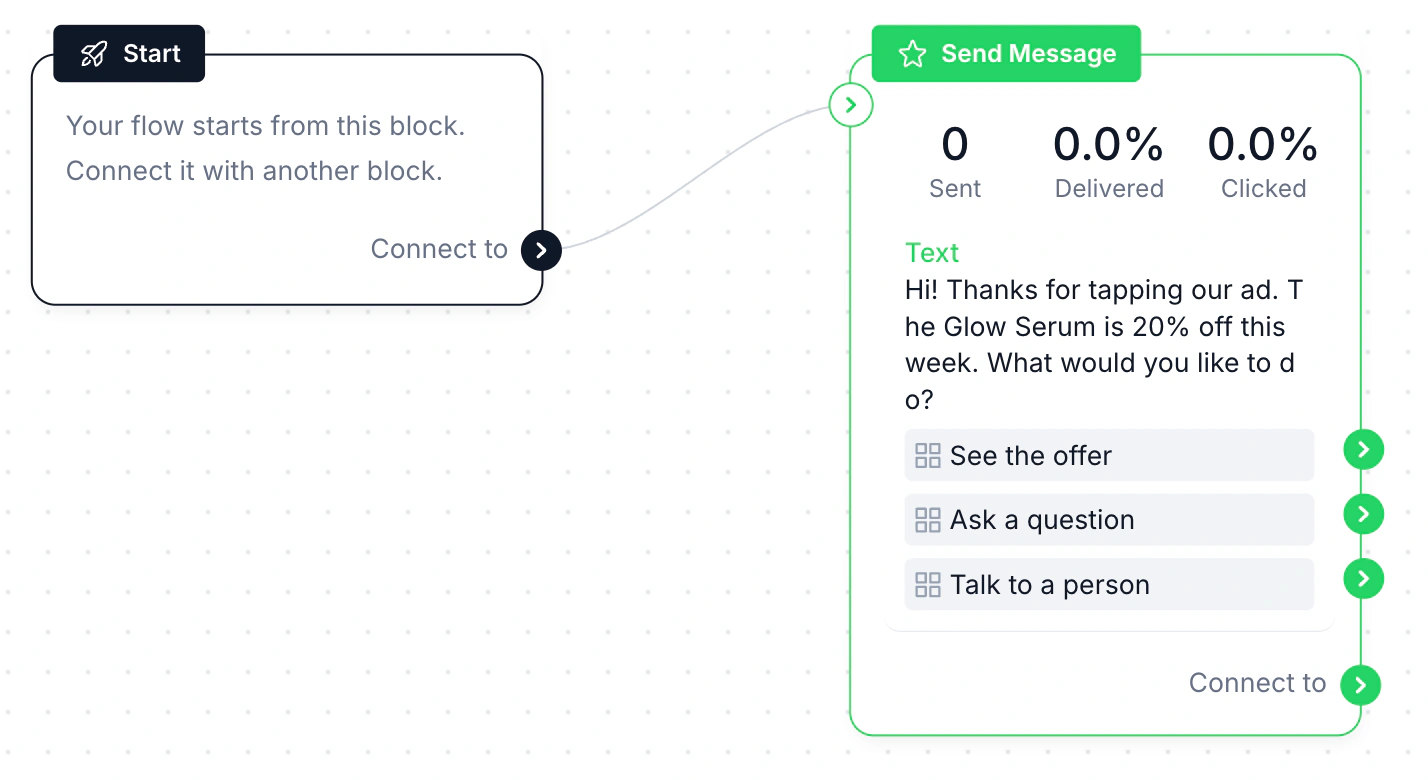
The first reply is a Send Message block with a greeting and up to three reply buttons. The screenshot shows the kind of flow used in the examples above, built for a skincare offer:
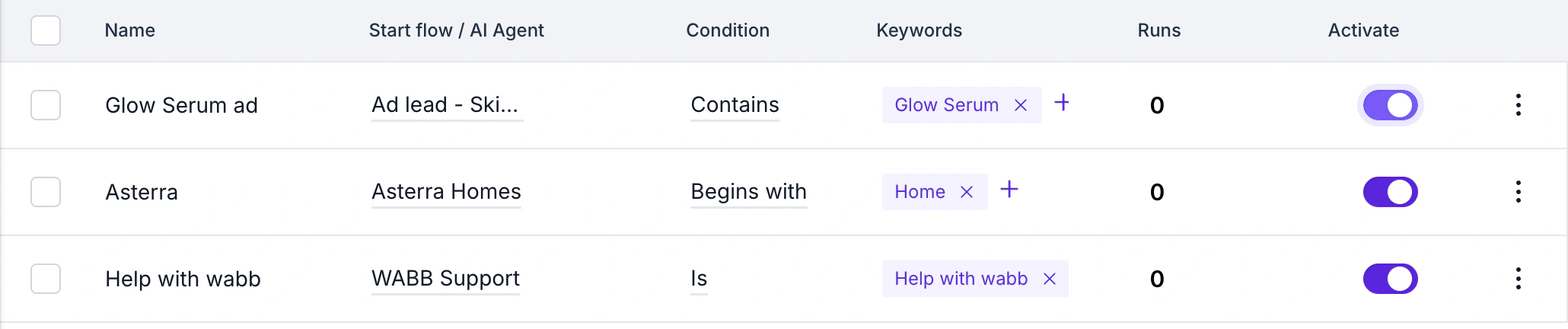
Under Automation → Keywords, a keyword that matches the ad’s opening message starts the flow or an AI Agent. One keyword per ad also gives you a count of how often each ad’s message arrived.
The full walkthrough, including the keyword dialog and how to follow up after 24 hours, is in the setup guide.
Adapt Any Example to Your Business
You don’t need 21 different tools. Take the example closest to yours, then change four things: the offer, the opening phrase, the questions in the first reply and the person who takes over. A few of the examples above, mapped to what you would set up:
| Example | Keyword | Flow | Handover |
|---|---|---|---|
| Free consultation (1) | Contains “free 15-minute” | Greeting, service buttons, time question | Assigned by service |
| Site visit (6) | Contains “site visit” | Day buttons, time of day, confirmation | Agent notified |
| Shop the look (8) | Contains the product name | Size buttons, stock check, payment link | Person if out of stock |
| Flash sale (15) | Contains “flash sale” | Code, deadline, shop button | None needed |
| Pre-purchase question (18) | Starts an AI Agent | Agent answers from your sizing guide | Person for unusual cases |
A fixed path suits offers with a clear choice, such as a code or a slot. For open questions, let an AI Agent answer from your own documents — see how to build one in WABB. Once leads start coming in, you can bring back the quiet ones with approved template messages. For the background of the format, read Click-to-WhatsApp ads in India.
How to tell which example works
Judge an ad by what happens after the tap, not by the tap: how many chats it started, how many people answered the first question, and how many reached a booking, a payment or a person. With one keyword per ad, the Runs count in Automation → Keywords gives the first number. Give each test time: WhatsApp’s own guide for these ads suggests running an ad for at least seven days.
Source: WhatsApp Business — Create ads that click to WhatsApp, checked 12 October 2026.
Common Click-to-WhatsApp Ad Mistakes
| Mistake | Why it hurts | Fix |
|---|---|---|
| A vague offer | “Contact us” gives the person no reason to tap. | Name what they get: a call, a price list, a code, a slot. |
| The same opening message in every ad | Every chat looks alike, so replies and results can’t be told apart. | Give each ad its own phrase, as in the setup guide. |
| A promise the team can’t keep | “Reply in 5 minutes” while nobody is online. | Promise what the first automatic reply delivers, and show working hours for people. |
| No way to reach a person | The flow ends with a link and a goodbye. | Add a Talk to a person button on every flow. |
| Sensitive data in the first chat | IDs, card numbers or health details asked for too early. | Collect the basics, then let a person take over. |
FAQ
Common Questions
What makes a good Click-to-WhatsApp ad?
One specific offer, one button and one next step, with an opening message that names the offer and an instant first reply. See What Makes a Click-to-WhatsApp Ad Convert.
How many buttons can the first reply have?
WhatsApp reply buttons are limited to three per message, so each example offers two or three choices. For more options, split the choice over two messages: a first question narrows it down, a second offers the details. The buttons are set in the flow’s Send Message block. See How WABB Answers These Ads.
Can I run these ads for real estate or loans?
Yes, but Meta asks you to declare a Special Ad Category for housing, employment and financial products and services when you create the campaign, and some audience options are limited. See Before You Run These: Meta’s Rules.
Do I need a different opening message for every ad?
Yes. The opening message is how a platform like WABB tells the ads apart: one ad, one phrase, one keyword, one flow. See How WABB Answers These Ads.
Are Click-to-WhatsApp conversations free?
A customer’s message is free, and a reply within 24 hours of the ad tap is free and opens a window of up to 7 days in which Meta doesn’t charge for marketing, utility, authentication or service messages. See Before You Run These: Meta’s Rules.
Can an AI Agent handle these chats instead of a flow?
Yes, especially for open questions such as sizing, eligibility or product details. A flow suits a short fixed path such as a flash sale code. See Adapt Any Example to Your Business.