Once a business outgrows the app, the next question is who will connect it to the API. The answers look alike: an inbox, broadcasts, a chatbot and a monthly price. This guide shows what really separates them, using Meta’s own pages and Meta’s rupee rates. For what the move needs first, see WhatsApp Business API requirements.
Choosing a WhatsApp API Provider: Quick Answer
The short version:
A WhatsApp API provider is a company that connects your number to the WhatsApp Business Platform, Meta’s API, and gives you the tools to use it: an inbox, broadcasts, flows and billing.
Meta’s rate card is the same for everyone, so choose by the kind of provider that fits your team, then by total monthly cost, who owns your number and how you can leave.
Meta’s rupee rates, three sample monthly costs, four provider types and one table of eight questions to send before you pay.
This guide does not rank companies, because plans change. Shortlist three providers of the right type, compare their totals and get billing answers in writing.
What Meta Charges, the Same for Every Provider
A provider cannot change Meta’s rate card. Whatever you choose, these rules apply to the messages themselves:
- Per delivered message. Meta charges for each delivered message from a business to a user, not for sent ones and not for messages users send you.
- One rate card. The rate depends on the message category and the country code of the recipient. Meta publishes it, with Indian rupees among its currencies.
- A free service tier. A service message is a free-form reply you send within 24 hours after a customer writes to you. Meta gives each business phone number 1,000 of them free every month, then charges, and unused ones do not roll over. With no payment method on file, delivery stops once the free tier is used up.
- Utility replies in the window. A utility template (an order or booking update) is charged even when you send it inside an open 24-hour window.
- An ad-click window. When a user messages you from a Click-to-WhatsApp ad, a reply from you opens a free window of up to 7 days. Meta’s own AI agent messages are the exception.
- Fixed change dates. Meta can change rates only on the first day of a quarter, and it gives at least one month’s notice for a rate-table change.
- Indian rupee billing. Meta has set a deadline for eligible customers to move their messaging accounts to Indian rupees. After it, Meta stops delivering from eligible accounts that are still on another currency.
And these are Meta’s rupee rates for messages to Indian numbers:
- Marketing (promotions): ₹0.8631 per delivered message
- Utility (order and booking updates): ₹0.1150 per delivered message
- Authentication (codes): ₹0.1150 per delivered message
- Service (replies inside 24 hours): ₹0.1150 per message after the first 1,000 each month
The rules follow Meta’s pricing page and the rates come from its India rate card. Replies in an ad-click window are explained in our Click-to-WhatsApp ads guide.
So a provider that advertises cheap messages is either passing on Meta’s rate or charging something on top. Ask which line is Meta’s and which line is theirs.
Source: Meta for Developers — WhatsApp Business Platform pricing (updated 30 Sep 2026); WhatsApp Business — Platform pricing, India, rupees, checked 20 November 2026. The deadline for rupee billing is 31 December 2026. Meta changes rates only on quarter days, so read the rate card again before you decide.
Three Sample Months: What Meta’s Fees Come To
Plan prices alone mislead, because the message fees do not appear on them. Work out one total per provider in five steps:
Count messages by Meta category
Split a typical month into marketing, utility, authentication and service messages, and note how many go to Indian numbers.
Multiply by Meta’s rate
Use the rupee rates above. Our WhatsApp Business API pricing guide for India explains the categories in plain words.
Subtract what Meta does not charge
Take off the first 1,000 service messages per number, and the messages inside an ad-click window.
Add the provider’s own charges
Add the plan for the seats and contacts you need, any AI credits, and every extra the provider lists.
Compare totals, not plan prices
Put every provider’s total for the same month side by side. A low plan price with a high seat or credit charge can end up the dearer option.
To see what steps 1 to 3 give, here are three sample months for one phone number:
- Small month: 1,000 marketing, 500 utility and 1,500 service messages cost ₹863.10 + ₹57.50 + ₹57.50 = ₹978.10.
- Growing month: 10,000 marketing, 5,000 utility and 10,000 service messages cost ₹8,631 + ₹575 + ₹1,035 = ₹10,241.
- Larger month: 100,000 marketing, 30,000 utility and 50,000 service messages cost ₹86,310 + ₹3,450 + ₹5,635 = ₹95,395.
Sample arithmetic with Meta’s rupee rates, before any platform fee and before GST. Meta’s volume tiers can lower utility and authentication rates at higher volumes, so the larger figure is an upper bound.
What the arithmetic shows: In the small month Meta’s fees are under ₹1,000, so the platform fee decides your total. In the larger month Meta’s fees are the bulk of the bill, so any markup on them matters more than the plan fee.
Tax changes the total too. For customers that Facebook India invoices monthly, Meta’s Help Center says WhatsApp Business messaging carries 18% GST. That moves the growing month from ₹10,241 to about ₹12,084. A provider’s own invoice to you may treat tax differently, so ask.
How you pay Meta’s fees also differs. Some providers ask you to top up prepaid credits, some invoice monthly, and with a Tech Provider Meta bills you directly. Ask which applies, whether you get a GST invoice, and what happens when the credits run out.
A provider’s own page may also show a different per-message figure for the same category. When it does, ask whether the gap is tax or a markup.
Source: WhatsApp Business — Platform pricing, India, rupees; Meta for Developers — WhatsApp Business Platform pricing; Meta Business Help Center — Billing in India, checked 20 November 2026. The prepaid-credit model and a per-message rate above Meta’s rate card both come from one provider’s own pricing page, read the same day.
Which Kind of Provider Fits You
This guide does not rank companies, but any provider you meet falls into one of four types. Start with the type, then compare providers inside it:
- Developer-first messaging platforms. You build your own flows and integrations on an API. They fit a team with developers and custom systems. Check how much inbox and no-code tooling you get out of the box.
- No-code platforms for small and mid-size businesses. A shared inbox, broadcasts and a chatbot builder, sold as a monthly plan by seats and features. They fit a sales or support team without developers. Check seat, contact and AI limits, and which features cost extra.
- Enterprise messaging providers. Sold on custom contracts, with account managers, service-level agreements and volume pricing on offer. They fit high volume, several numbers or strict procurement. Check onboarding time and contract terms.
- WhatsApp inside a CRM or helpdesk. You manage WhatsApp from the tool your team already uses. It fits a team that lives in that tool. Check whether broadcasts, flows and template tools are included.
The four types are our own grouping, based on how providers describe themselves on their public pages.
Choose by your team first:
- No developers: start with no-code platforms.
- Developers and custom systems: start with developer-first platforms.
- A team that lives in a CRM: look at WhatsApp inside it.
- High volume or several numbers: look at enterprise providers.
Then shortlist three providers of that type and compare their totals with the method above.
If you want named side-by-side comparisons, we have two: seven platforms compared on pricing, AI, integrations and team limits, and a second comparison focused on what a small team pays once add-ons are on.
Provider or Direct, and Who Is Who
You can also skip a provider. Meta’s partner page sends developers who build an app only for their own business to its Cloud API guide instead. Then you handle onboarding, templates, an inbox and support yourself, so a provider is simpler for a team without developers.
Meta calls providers partners and names three roles. The role decides who invoices your message fees and whether you must add a payment method in Meta’s billing centre.
- Solution Partner. Offers the full set of platform services: messaging, billing, integration and support. It has a credit line from Meta, a payment arrangement it can extend to you, so you may not need your own payment method, and it can bill you for API use directly.
- Tech Provider. Can offer the same services, but has no credit line. You add your own payment method after sign-up, Meta bills you for API use, and the provider bills you for its own services.
- Tech Partner. A Tech Provider that is, or can become, a Meta Business Partner. It has no credit line either, so for billing it works like a Tech Provider.
The list paraphrases Meta’s partner page. Neither role is better; they bill differently.
To check a provider’s role, use the Find a partner button on Meta’s WhatsApp Business partners page. The directory page redirected when we tried it, so also ask the provider to show its role in writing.
Source: Meta for Developers — Partners (updated 21 May 2026), checked 20 November 2026.
Eight Things That Differ, and What to Ask
Everything a provider sets itself falls into eight areas. Send the questions below to every provider on your shortlist and compare the answers. Vague replies tell you as much as clear ones.
| Area | Ask the provider | Why it matters |
|---|---|---|
| Role and billing | Are you a Solution Partner or a Tech Provider? Who invoices Meta’s message fees, in which currency, and is it prepaid credit or a monthly invoice with GST? | It decides who invoices API use and whether you add a payment method in Meta’s billing centre. Meta has set a deadline for eligible accounts to be billed in Indian rupees. |
| Message fee line | Does the rate on my invoice match Meta’s rate card? | A provider’s per-message rate can differ from Meta’s. If it does, ask whether the gap is tax or a markup. |
| Platform fee | What does each plan cap: seats, contacts, flows, AI messages? What is charged extra? | Caps decide the plan you actually need, not the one on the banner. |
| Account ownership | Which WhatsApp account and Meta business portfolio will my number sit in? | The portfolio is the Meta account that groups your business assets. Whose account holds the number matters if you move later. |
| Onboarding | Can I connect my Business app number and keep the app? | Meta’s coexistence setup allows it, with some feature changes. |
| Team tools and automation | How many seats does each plan include, and which flows, keywords and AI agent come with it? Do AI replies use credits? | Seats and AI use are common extra charges. |
| Integrations | Which plan unlocks API access, webhooks (automatic data sharing with other tools), CRM and store connections? | The integration you need may sit on a higher plan. |
| Support and exit | Who answers technical questions, and in which hours? What happens to my contacts, templates and number if I leave? | A blocked template cannot wait a week, and your exit cost is cheapest to learn before you sign. |
Copy the middle column into an email, and keep the answers in writing.
On onboarding, Meta recommends connecting through its Embedded Signup flow, the sign-in screen where you give a provider access to your WhatsApp account. For a number already in the Business app, Meta’s coexistence setup lets it work in the app and through the API together. Meta says broadcast lists in the app then become read-only, and linked devices are unlinked and must be linked again.
Some provider pages describe another route: delete the WhatsApp account on your number first, and old chat backups cannot be imported. Read Meta’s page on onboarding Business app users or our WhatsApp vs WhatsApp Business guide before you choose.
Source: Meta — Partners; Meta — Pricing; Meta Business Help Center — Solution providers; Meta — Onboard Business app users, checked 20 November 2026. The delete-first route comes from one provider’s own FAQ page, read the same day.
Five Warning Signs
These do not prove a provider is bad, but each one is a reason to ask more before you pay:
You cannot get a straight answer on who invoices Meta’s message fees.
The price is quoted per message, without saying whether Meta’s fee is inside it.
The number or the WhatsApp account sits only in the provider’s portfolio, and you have no admin access.
There is no way to export your contacts or templates.
The provider promises that your business verification will be approved, and cannot say what happens if Meta says no.
Clear answers to the questions above settle these worries.
Switching Later: Protect Yourself Before You Sign
Choosing is easier when leaving is possible. Three steps keep your options open:
- Verify your own business. Meta’s partner page says your business must be verified to get higher limits and the official business account status. Some partners can submit the request for you, but the verified business should be yours.
- Keep admin access. You can create the WhatsApp account in Meta Business Suite yourself and give the provider access to it.
- Get the exit steps in writing. Meta’s migration page says moving a number is not supported for accounts on its newer account model; sharing access to the account that owns the number still works.
The steps summarise two Meta pages, linked below.
Source: Meta — Partners; Meta — Migrate a phone number via Embedded Signup, checked 20 November 2026.
Where WABB Fits: Our Answers to the Same Questions
WABB is our WhatsApp automation platform, a no-code platform in the terms above, and one of the providers you may compare. Read this section as our own answers and not as an independent verdict.
On platform fee, Starter is ₹3,006 a month and Pro is ₹4,410 a month on monthly billing, Enterprise is custom and the AI Agent Builder is ₹2,000 a month. Both plans list 100K contacts and unlimited chats, Starter lists 5 team members, and API and webhook access, Zapier and Google Sheets come with Pro. The pricing page lists WABB’s plans only. Meta’s message fees are Meta’s rates, not part of the plan price.
Source: WABB pricing page, checked 20 November 2026. Plans change, so check it again before you buy.
On Meta role and billing, WABB connects numbers to Meta’s official WhatsApp Business API. We do not list a Meta partner tier on our public pages, so ask us if your procurement needs one. WABB invoices Meta’s message fees to you.
Our public pages do not publish a per-message rate, so ask for it in writing and check it against Meta’s rate card. All WABB fees are shown in Indian rupees and paid through Razorpay, and our terms say charges include applicable taxes.
On account ownership, you connect through Meta’s sign-in, either with Coexistence for a Business app number or directly through your Facebook Business Portfolio. For a Coexistence number, Meta says the converted account stays in your business portfolio and is shared with the provider.
Source: WABB FAQs; WABB Terms of Service; Meta — Onboard Business app users, checked 20 November 2026.
On support, Starter lists basic support. Pro adds a dedicated customer success manager, personal onboarding and setup, and priority support for technical questions.
On onboarding, you choose between connecting your Business app number, which syncs chat history, and moving the number to WABB, which does not.
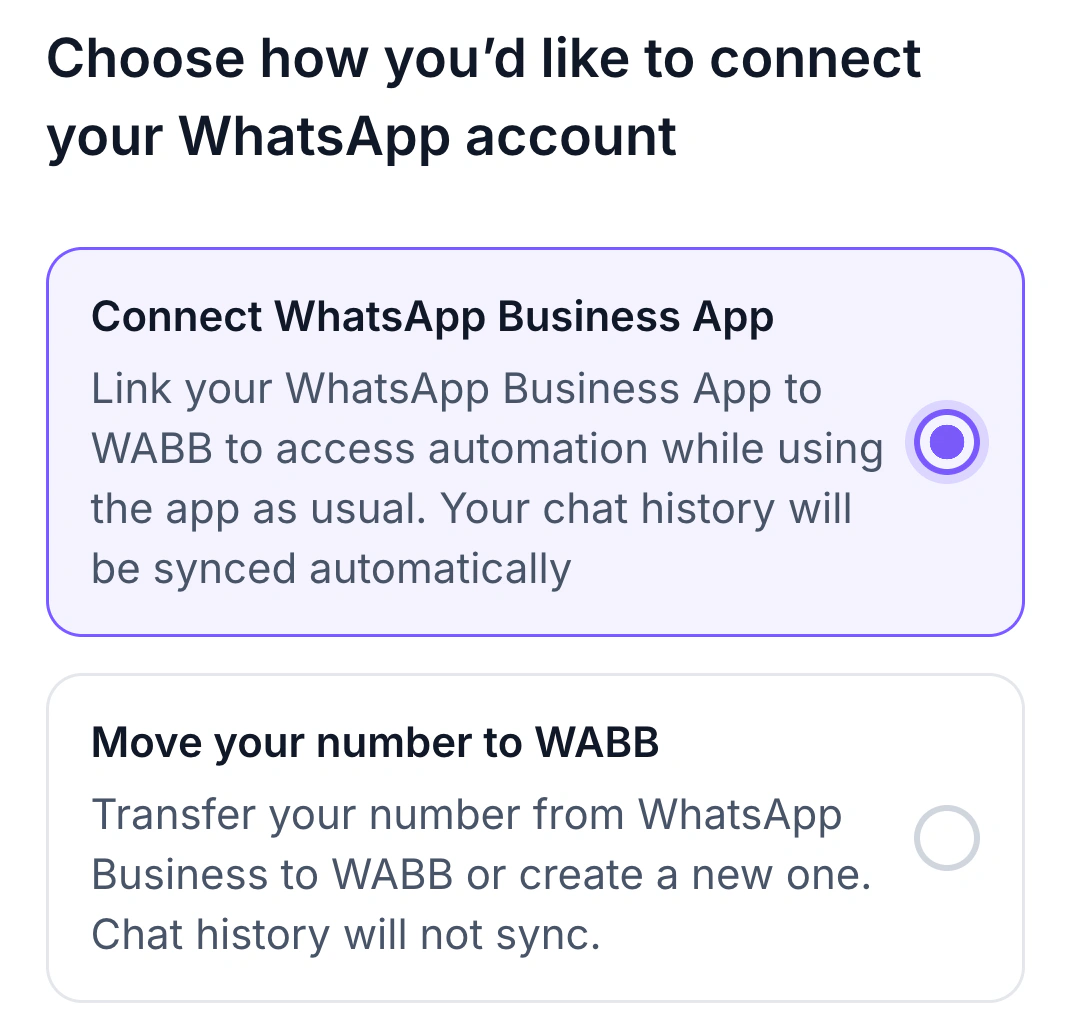
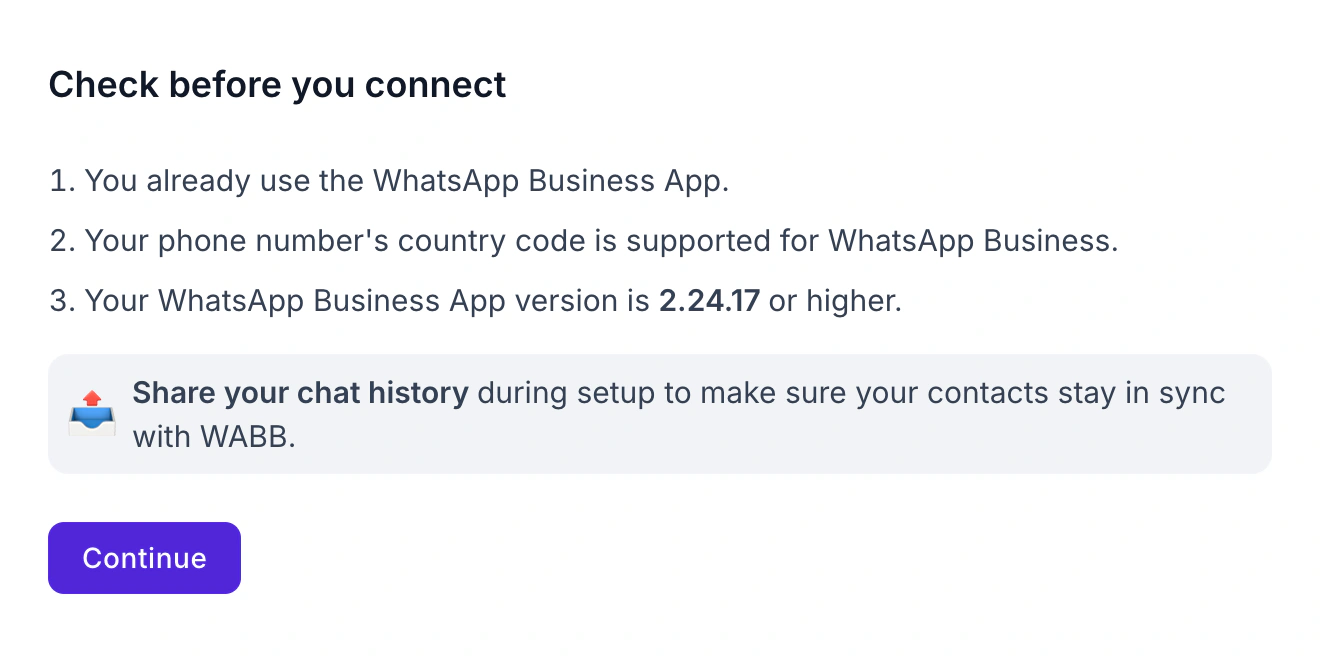
Before it connects a Business app number, WABB shows a checklist and asks you to confirm that you already use the Business app, that your country code is supported and that the app version is recent enough. It also asks you to share your chat history so contacts stay in sync.
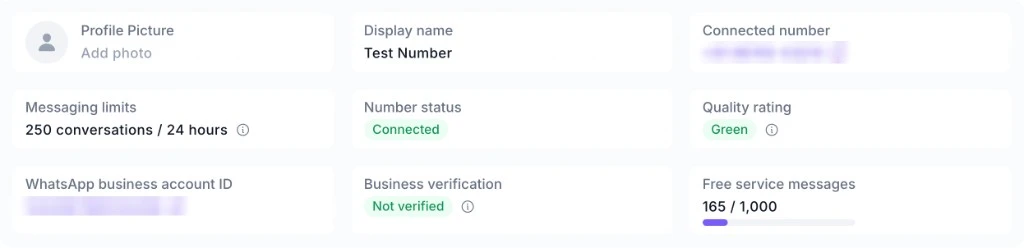
Once a number is connected, Settings → Connection shows its status, quality rating, messaging limit and business verification state. A Free service messages counter lets you compare Meta’s free tier with your real use.
On templates, the Message templates tab of Settings → Connection lists each template with its category, language and status. In Create template, step 1 is Select category, and WABB’s form offers Marketing and Utility. The category decides which Meta rate a template message is charged at, so read Meta’s template categorization rules before you choose.

On price and tax, Settings → Subscriptions lists the AI Starter add-on at INR 2,000 + GST a month. The public pricing page does not say whether its plan prices include GST, so ask before you compare totals.

On team tools, Chats is the shared inbox. Its left filters split conversations into All, Unassigned and Mine. Inside a chat, the Actions panel shows who the chat is assigned to, with Change and Unassign me buttons, next to Mark as Closed.
On automation, Automation → Keywords starts a flow or an AI Agent when a customer’s message matches: the Create new keyword form asks for a name and the flow or AI Agent to start. For what an AI Agent does, see WhatsApp AI for business in India.
On broadcasts, a broadcast is a flow you launch for the contacts you target. You name it, pick the Flow, optionally Set time, narrow the list with Add filter or Use Segment, and check who gets it with Show users before you press Start. Meta’s opt-in and template rules still apply to every broadcast sent through the API.
We checked these screens on a test workspace and only viewed them. We did not connect a live number, create a template, activate a plan or send a broadcast for this guide.
On exit, our terms list refund windows of 7, 20 and 30 calendar days after the first purchase, requested by email, and let you ask for your account and data to be deleted. In the app, Contacts → Download Report builds an Excel file of your contacts, and Import contacts brings them in. We found no template export in the app.
For a Coexistence number, Meta says you can disconnect it from the API in the Business app under Settings → Account → Business Platform → Disconnect Account. For a number you moved into WABB, ask us in writing how moving it out works.
Source: WABB Terms of Service; Meta — Onboard Business app users, checked 20 November 2026. We checked the Download Report button on the Contacts page and in the product code, and generated no file.
FAQ
Common Questions
Which is the best WhatsApp API provider in India?
There is no single winner. The right choice depends on your team, your message volume and whether you have developers. Pick the provider type that fits, shortlist three, then compare their total monthly cost and their answers to the eight questions. See Which Type Fits You.
How much does a WhatsApp API provider cost in India?
Two parts. Meta charges per delivered message: ₹0.8631 for marketing, and ₹0.1150 for utility, authentication and service messages after the first 1,000 free service messages each month. On top comes the provider’s own platform fee, which varies. See Sample Monthly Costs.
What is a WhatsApp API provider?
It is a company that connects your number to the WhatsApp Business Platform for you, and adds an inbox, broadcasts, automation and billing. Meta calls such companies partners. See Provider or Direct.
Do I need a Solution Partner, or is a Tech Provider enough?
Both can offer the full set of platform services. A Solution Partner can lend you its credit line and invoice API use, while a Tech Provider’s customers add their own payment method and get Meta’s invoice. See Provider or Direct.
Can I keep using my WhatsApp Business app number?
Yes, if the provider supports Meta’s coexistence setup, which lets the same number work in the app and through the API. A few app features change once it is connected. See What to Ask.
Is there a free WhatsApp Business API?
Not for all messages. Meta charges for delivered messages, with a free tier of 1,000 service messages per number each month and free replies in an ad-click window. A provider’s platform plan is a separate cost. See What Meta Charges.
Can I switch provider later?
Meta documents moving a number between providers, but its migration page says this is not supported for accounts on its newer account model. Ask each provider for its exit steps before you sign. See Switching Later.